
Views: 0 Author: Site Editor Publish Time: 2026-03-31 Origin: Site


DC axial fans are widely used in various industries for their efficiency, reliability, and compact design. These fans are commonly found in applications ranging from cooling electronic devices and systems to ventilation in automotive and HVAC systems. However, like any mechanical device, DC axial fans can experience issues that impact their performance. Proper troubleshooting and regular maintenance are crucial to ensuring that these fans continue to operate effectively.
At Fanova (Suzhou) Motor Technology Co., Ltd., we specialize in manufacturing high-quality DC axial fans designed to meet the needs of diverse applications. With our years of experience, we've gathered valuable insights into common DC axial fan problems and their solutions. In this article, we’ll take a closer look at how to troubleshoot and maintain your DC axial fan, ensuring it operates efficiently and effectively.
Whether you are an experienced technician or new to fan maintenance, this guide will help you identify and resolve common fan issues step by step. By following the advice outlined below, you can maximize the lifespan and performance of your DC axial fan, avoiding costly repairs or replacements.
DC axial fans are reliable and efficient tools for a variety of applications, but like any mechanical system, they can experience issues over time. Proper troubleshooting and regular maintenance can ensure optimal performance, extend the lifespan of the fan, and prevent costly repairs. In this article, we’ll address some common problems that DC axial fans face, along with step-by-step troubleshooting and maintenance tips for each.
One of the most common issues that users face with DC axial fans is when the fan fails to start. This can happen for various reasons, including power supply issues, wiring problems, or motor faults. When a fan doesn’t start, it can lead to delays in operations and frustration, so it’s important to address the problem quickly.
· Power supply failure: The fan may not be receiving power due to a blown fuse or a faulty connection.
· Wiring issues: Loose or disconnected wires may be preventing the fan from starting.
· Faulty motor: If the motor itself is malfunctioning, the fan will fail to operate.
1. Check the power supply: Make sure the fan is connected to a functioning power source, and confirm that the voltage matches the specifications required by the fan.
2. Inspect wiring: Look for any loose, disconnected, or damaged wires. If any connections appear weak, tighten them. For damaged wires, replace them with new ones to ensure reliable operation.
3. Test the motor: If possible, use a multimeter to check the motor's continuity. If the motor does not show continuity or is damaged, it may need to be replaced.
Strange noises, such as buzzing, grinding, or rattling, can indicate mechanical issues with the DC axial fan. These noises often come from components that are loose, dirty, or worn out. While some minor noise is normal, persistent or loud noises can indicate a problem that needs addressing.
· Dirt or debris: Dust and other particles can accumulate on the fan blades, causing friction and noise.
· Loose components: Worn-out or loose fan blades, bearings, or other internal parts can create unusual sounds during operation.
· Motor issues: A malfunctioning motor or motor bearings can cause grinding or buzzing noises.
1. Turn off the fan: Before troubleshooting, make sure the fan is powered off to avoid injury or further damage.
2. Inspect the blades for dirt or debris: Check the fan blades for any buildup of dirt, dust, or debris. Use compressed air or a soft cloth to clean the blades and surrounding components. Make sure to clean any buildup on the air intake as well.
3. Check for loose components: Inspect the fan blades, motor, and other parts for any loose screws, bolts, or components. Tighten any connections that are loose.
4. Lubricate the bearings: If the fan uses ball bearings or any rotating components, apply a small amount of appropriate lubricant to reduce friction and eliminate any grinding or rattling noises.
If your DC axial fan is running slower than usual or is not providing the required airflow, it could be due to various factors, such as power issues, motor wear, or dirty fan blades. Inconsistent airflow can reduce the fan's overall performance, which could lead to inefficient operation and an increase in energy consumption.
· Voltage fluctuations: Inconsistent power supply can cause the fan to run at reduced speed or with less efficiency.
· Worn-out motor: Over time, the motor may lose its efficiency, leading to slower operation.
· Dirty fan blades or air intake: A buildup of dust, dirt, or debris can restrict airflow, causing the fan to work harder and less efficiently.
1. Check the power supply: Ensure that the fan is receiving the correct voltage. Use a voltmeter to verify the voltage levels. If there are fluctuations, resolve the issue with the power source.
2. Inspect the motor: If the motor is running slower than usual, it may have reached the end of its operational life. Use a multimeter to check for motor performance. If necessary, consider replacing the motor.
3. Clean the fan blades and intake: Dirty blades and air intake can reduce airflow and make the fan work less efficiently. Remove dirt and debris from both the fan blades and the air intake to ensure optimal airflow.
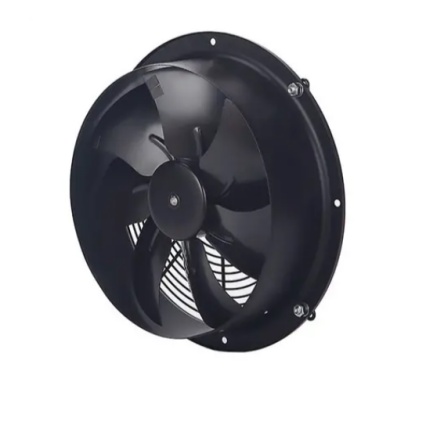
Overheating is another common issue that can lead to reduced fan performance or even permanent damage to the motor and other components if not addressed in time. An overheating DC axial fan can result from improper airflow, excessive load, or issues within the motor itself. Identifying the root cause and performing the necessary maintenance is crucial to prevent any long-term damage.
· Blocked Airflow: One of the most common causes of overheating is obstructions in the fan’s intake or exhaust that restrict the airflow. When airflow is blocked, the fan’s motor has to work harder to push air through the system, generating excess heat.
· Motor Malfunction: A malfunctioning motor can also lead to overheating. This could be caused by worn-out components or damaged windings that cause the motor to overheat. Overheating motors can significantly reduce the lifespan of the fan and may even cause it to fail if not addressed promptly.
· Excessive Load: Running the fan under excessive load or continuously at high speeds can lead to overheating. If the fan is tasked with more work than it is designed to handle, or if it runs at full speed for extended periods, the motor will generate excess heat, which can damage the internal components.
1. Check Airflow: The first step in troubleshooting overheating is ensuring that the fan’s intake and exhaust vents are free from obstructions. Any buildup of dirt, debris, or external objects can restrict airflow and cause the fan to overheat. Clear any obstructions and clean the fan thoroughly to improve airflow. Additionally, make sure that the fan is installed in a location that allows for adequate air circulation.
2. Inspect the Motor: If the fan is still overheating despite having clear airflow, inspect the motor for any signs of malfunction. Check the motor windings for any visible damage, such as burn marks, fraying wires, or broken components. If the motor appears to be malfunctioning, it may need to be serviced or replaced. Regular maintenance of the motor, such as lubricating moving parts and ensuring the motor is clean, can prevent overheating issues in the future.
3. Check for Load Overload: Review the operational conditions of the fan. If the fan is constantly running at high speeds or handling an excessive load, this can cause the motor to overheat. Ensure that the fan is used within its specified parameters and consider reducing the load or adjusting the fan speed to prevent overheating. If the fan is part of a larger system, check the overall design to ensure that the airflow requirements match the fan’s capacity.
Troubleshooting DC axial fan issues can be straightforward if you follow the proper steps and understand the potential causes of common problems. By performing routine cleaning, checking the electrical system, and inspecting the mechanical components, you can ensure that your fan operates efficiently and lasts longer. Regular maintenance is key to preventing costly repairs and downtime.
At Fanova (Suzhou) Motor Technology Co., Ltd., we are committed to providing high-quality DC axial fans designed for optimal performance in various industries. If you are experiencing any issues with your fan or need assistance with selecting the right model, feel free to contact us. Our team is always ready to help you with troubleshooting and maintenance tips to keep your systems running smoothly.
1. How often should I clean my DC axial fan?
It’s recommended to clean your DC axial fan at least once a month, or more frequently if it operates in a dusty environment or experiences heavy use.
2. What should I do if my DC axial fan is overheating?
Check for obstructions in the airflow path, ensure the motor is functioning properly, and verify that the fan is not overloaded. Clean the fan regularly to prevent overheating.
3. Can I replace the motor of my DC axial fan myself?
If you have the necessary skills and tools, you can replace the motor yourself. However, it’s best to consult a professional technician if you’re not familiar with the process.
4. Why is my DC axial fan running slowly?
Slow operation could be due to voltage fluctuations, motor issues, or dirt buildup on the fan blades. Ensure that the power supply is stable and the fan is clean and well-maintained.


